Compare Like With Like: Date Range Mistake That Makes Good Rank Data Look Wrong
Most rank arguments are date range arguments. Brandon Young on comparing like with like, and a weekly routine that makes rank data clear.
Automated Amazon Review Requests help Amazon sellers save time by sending eligible review requests automatically.
Amazon reviews can influence trust and conversion, but requesting them manually creates repetitive work that becomes difficult across larger order volumes.
Most sellers know the routine of opening Seller Central, finding eligible orders, requesting reviews, and repeating everything again tomorrow.
Amazon limits review requests to a specific eligibility window, so missed days can permanently remove opportunities from your follow up process.
Automated Review Requests handles that daily routine inside Data Dive, letting sellers focus on launches, advertising, inventory, and broader growth priorities.
Once enabled, the feature sends Amazon’s standard review request automatically for every eligible order according to the timing you choose.
Nothing changes about the customer message, because Data Dive automates the same Amazon approved request available directly through Seller Central.
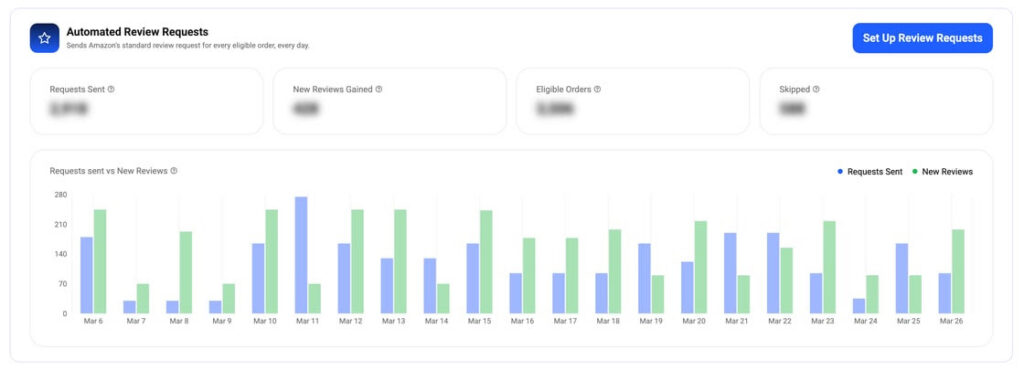
The Automated Review Requests dashboard shows request activity, eligible orders, skipped orders, and review results in one clear view.
1. CHOOSE YOUR PRODUCTS
Select your complete catalog, or include only specific ASINs you want covered by automated review requests inside Data Dive.
2. CHOOSE YOUR TIMING
Choose when each request should be sent, while keeping every order inside the timing window Amazon currently permits.
3. LET DATA DIVE RUN IT
After setup, Data Dive checks eligible orders daily and sends review requests automatically without requiring repeated Seller Central visits.
Requests Sent: See how many eligible review requests Data Dive successfully sends across every product included within your current automation settings.
New Reviews Gained: Track newly gained reviews beside request activity, giving teams a clearer view across the same reporting period.
Eligible Orders: See how many purchases currently qualify for review requests according to Amazon’s timing rules and order eligibility requirements.
Skipped Orders: Identify orders that did not receive requests, making exceptions easier to understand without checking individual purchases manually again.
Automated Review Requests does not write custom emails, change Amazon messaging, or contact customers outside Amazon’s standard review request process.
Every eligible buyer receives Amazon’s existing request template, matching the experience sellers would trigger manually through Seller Central themselves.
That gives sellers consistency without introducing custom wording, incentives, review gating, or other unnecessary changes to Amazon’s established workflow.
MORE TIME BACK
Automated requests reduce daily order checks, giving sellers more time for launches, advertising, inventory planning, and customer growth.
CONSISTENCY EVERY DAY
Daily automation keeps eligible requests moving consistently, even during launches, seasonal peaks, advertising pushes, and other demanding operating periods.
CLEAR VISIBILITY
The dashboard keeps request activity visible, allowing teams to monitor sent requests, new reviews, eligible orders, and skipped orders.
Yes, Data Dive sends Amazon’s standard review request using the same process available through Seller Central for eligible orders.
Sellers can include every product in their catalog, or limit automation to specific ASINs needing focused review support.
You control request timing for eligible orders, allowing automation to follow your preferred schedule within Amazon’s permitted review window.
Request activity appears inside Data Dive beside new reviews, eligible orders, skipped orders, and daily reporting trends for easier monitoring.
Automated Review Requests is available inside Data Dive, where sellers can choose products, timing, and activate the feature quickly.
After setup, Data Dive handles eligible requests each day, giving teams more time for work that directly supports growth.
Spend less time repeating administrative clicks and more time improving products, advertising performance, inventory planning, and customer experience.
For broader marketplace guidance, visit Amazon Seller Central to review current review request policies, account tools, and seller requirements.
Most rank arguments are date range arguments. Brandon Young on comparing like with like, and a weekly routine that makes rank data clear.

Data Dive’s Dive Box now warns you about competitors selling under about 100 units a month before a dive runs, so you learn from the sellers who are actually selling.