Compare Like With Like: Date Range Mistake That Makes Good Rank Data Look Wrong
Most rank arguments are date range arguments. Brandon Young on comparing like with like, and a weekly routine that makes rank data clear.
Your Amazon research often lives in one tab, while important decisions happen somewhere else without the full picture in front.
Data Dive MCP closes that gap by bringing live account data directly into the AI tools you already use.
It connects Data Dive with Claude, ChatGPT, and other supported AI tools, so your business data becomes immediately accessible.
Setup takes about a minute through Settings → MCP, making the connection simple to activate inside your Data Dive account.
Once connected, you can ask questions, start a Niche Dive, or set up Rank Radar directly from your AI assistant.
The assistant always asks for confirmation before taking action, giving you control over anything it runs inside your account.
Data Dive MCP is currently available to customers using Standard and Enterprise plans across supported AI tools and workflows.
MCP stands for Model Context Protocol, an open standard connecting AI assistants directly with outside tools and their live data.
Instead of pasting information into chat, your AI can work with current business data from the tools you already use.
For Amazon sellers, that means ChatGPT or Claude can finally understand your catalog, keywords, rankings, and ongoing research.
Without that connection, AI understands Amazon broadly, but it cannot see what is actually happening inside your specific business.
With MCP, it can read your real Data Dive research and use that context when answering questions or suggesting actions.
That difference matters because larger sellers usually have plenty of data spread across dashboards, reports, exports, and different tools.
The bigger challenge is bringing that information together, understanding what changed, and deciding what action should happen next.
MCP helps reduce that gap by giving your AI access to the information needed for faster, better informed decisions.
Data Dive is not the only Amazon tool with an MCP connector, since Helium 10 and Jungle Scout launched theirs earlier.
The main difference is what each connector can actually do once your AI assistant is connected to your account.
Most Amazon MCPs focus on retrieval, so you ask a question and the AI returns the information it can access.
Data Dive supports retrieval too, while also letting you start a Niche Dive or create Rank Radar tracking from chat.
Before anything runs, the assistant asks for confirmation, so you stay in control of every action inside your account.
The second difference is data depth, because Data Dive gives your AI access to complete research instead of brief summaries.
That includes full Niche Dives, keyword matrices, competitor listing attributes, and Rank Radar history across the research you already use.
| Retrieval-only MCPs | Data Dive MCP | |
|---|---|---|
| What it does | Answers questions about your data | Answers questions, and runs research for you |
| What the AI sees | Summarized metrics | Full Niche Dives, keyword matrices, competitor attributes |
| Can it act? | Not typically | Yes — starts Niche Dives, sets up Rank Radar, with confirmation |
| Setup | Varies | About a minute. No developer, no config file |
Open your Data Dive settings and select MCP to find the server URL and setup guides for supported assistants.
That same page also lets you review existing connections and manage which AI tools currently have access to Data Dive.
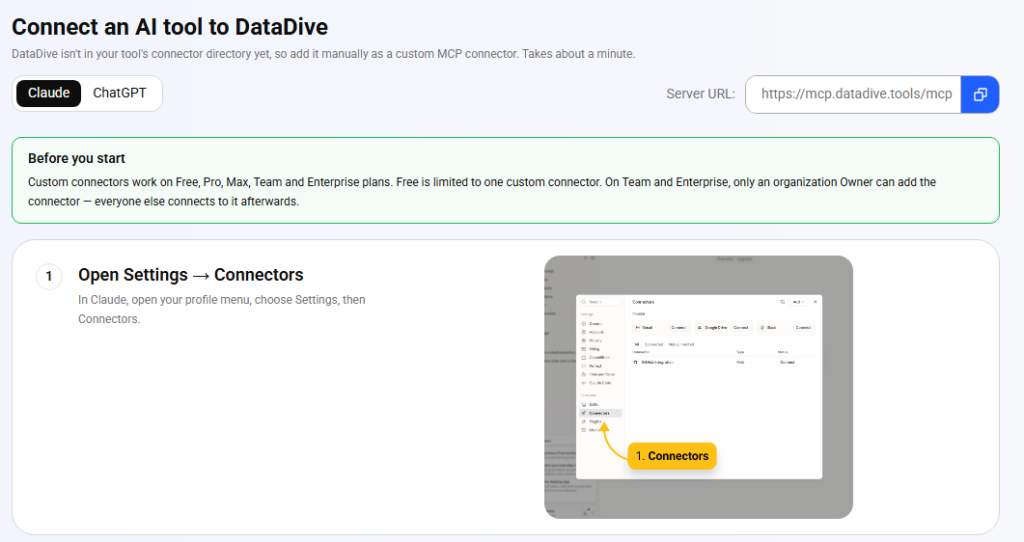
In Claude, open your profile menu, choose Settings, then Connectors.
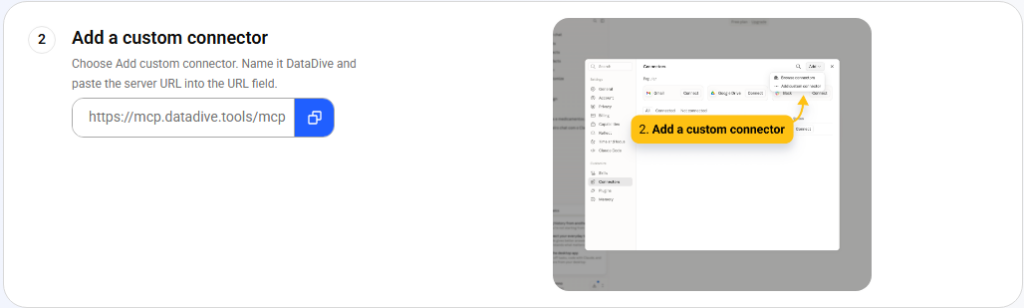
Choose Add custom connector. Name it Data Dive and paste the server URL into the URL field:
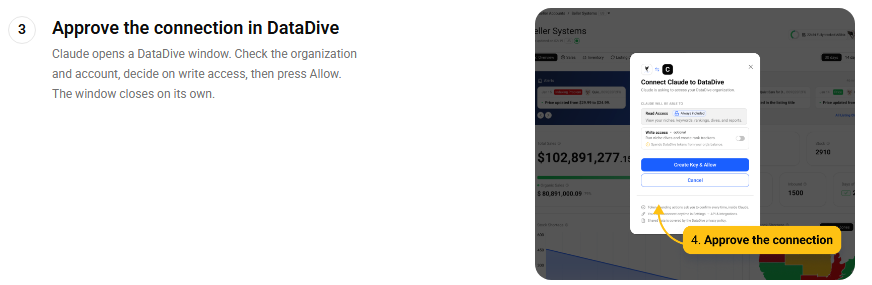
Claude opens a Data Dive window where you confirm the correct organization and account before approving the connection.
You can also choose whether to grant write access, then select Allow to complete the authorization process.
Read access lets the AI view your niches, keywords, dives, reports, and other connected research inside Data Dive.
Write access is optional and allows the AI to create Niche Dives or set up Rank Radar tracking.
If you only want answers, leave write access disabled and add it later when you need additional actions.
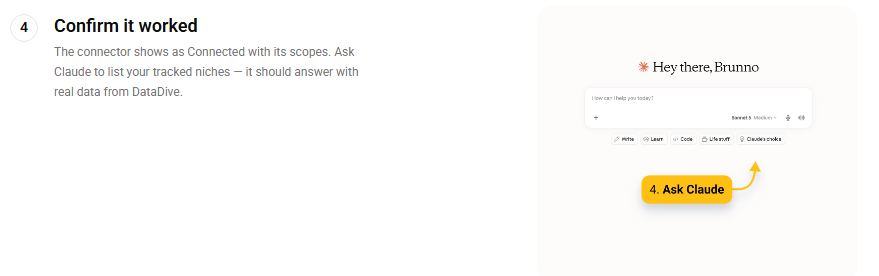
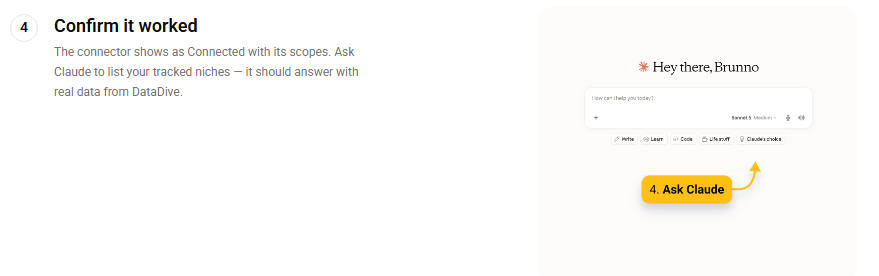
Back in Claude, the connector should now show as Connected with its scopes listed. Ask it something small to prove the pipe is open:
If it comes back with your actual niches, you’re done.
ChatGPT works too, with more restrictions worth knowing about before you start:
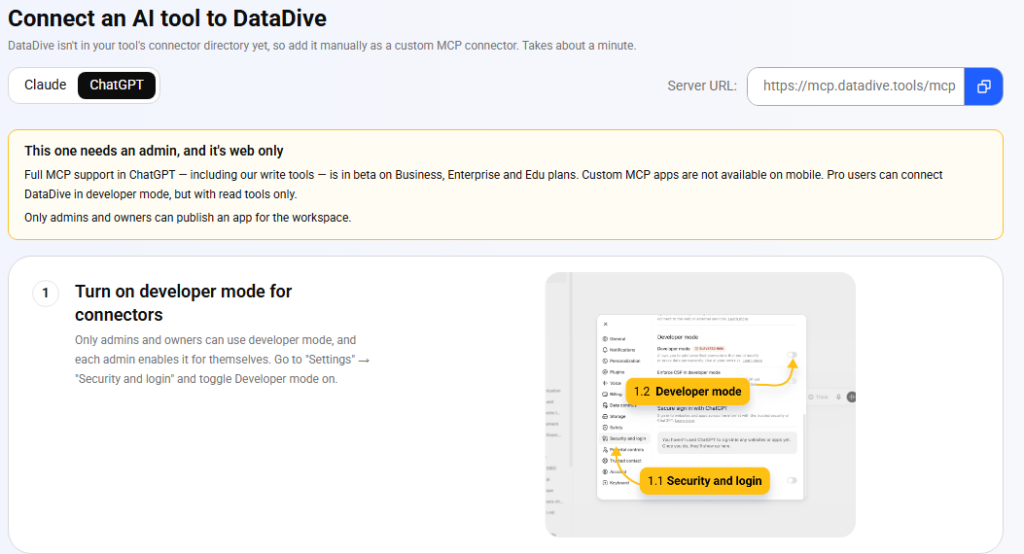
Go to Settings → Security and login and toggle Developer mode on. Each admin enables this for themselves.
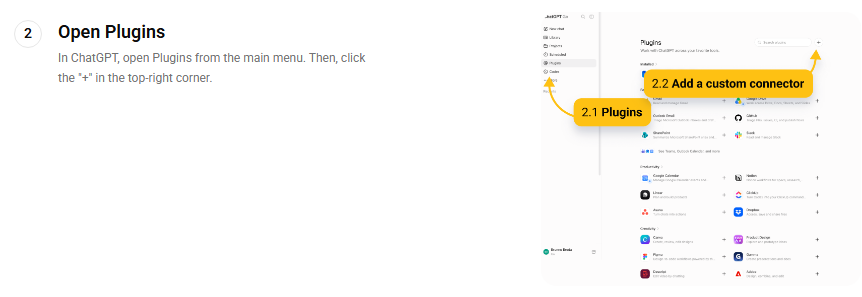
From the main menu, open Plugins, then click the + in the top-right corner.
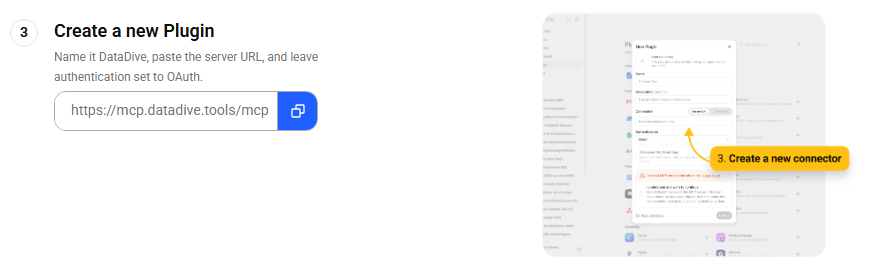
Name it Data Dive, paste the same server URL (https://mcp.datadive.tools/mcp), and leave authentication set to OAuth.
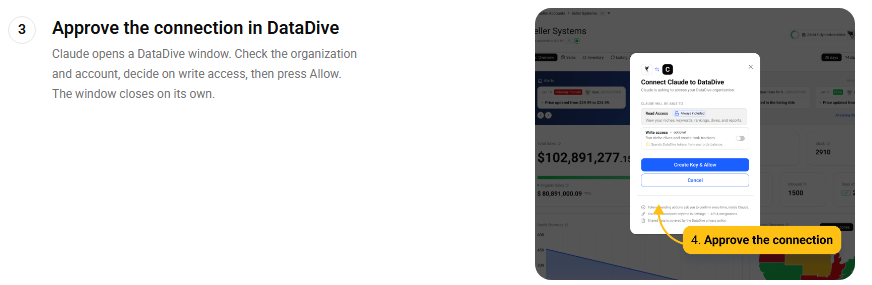
A browser tab opens on the Data Dive consent screen. Confirm the organization and account, then press Allow.
Ask ChatGPT to list your tracked niches. Real data back means you’re connected.
Below are the workflows sellers get value from first. Each one is a prompt you can copy, paste, and adjust.
The single best habit to build. Instead of opening four dashboards and squinting at line charts, you get a readable summary in ninety seconds.
How are my rankings trending across everything in Rank Radar? Flag anything
that dropped more than five positions in the last seven days, tell me which
of those matter based on the keyword's volume, and give me a one-paragraph
summary I can read to my team in ninety seconds.Most sellers find out a competitor moved on them several days after it starts costing money. This closes that window.
What changed in my tracked competitor set this week — pricing, ranking, new
entrants into the top 10? Tell me which single change is most likely to cost
me revenue this month, and what my options are.
The highest-stakes moment in a seller’s month is the one right before money gets committed to a product. Ask the data to argue with you.
Pull my three most recent niche dives. For each one, score it against my
go/no-go criteria: top-10 revenue concentration, review-count moat on the
incumbents, price spread, and how many listings look genuinely optimized.
Rank them and tell me which single one you'd put money behind — and what
would have to be true for you to be wrong.
That last clause does most of the work. Asking an AI what would make it wrong is how you get an analysis instead of a cheerleader.
In my saved niches, find every listing in the top 10 that is ranking well
despite a weak listing — thin title keyword coverage, missing attributes
customers keep mentioning, or low image count. Those are the ones I can
out-execute. Show me the gap for each.Using the keyword data from my [niche name] dive, build me a three-phase
launch keyword plan. Phase 1: low-competition terms I can rank for in two
weeks. Phase 2: mid-volume terms to attack once I have review velocity.
Phase 3: the head terms. For each phase give me the terms, why they're in
that phase, and what has to be true before I move to the next one.Hand this output straight to your copywriter. It pairs well with the AI Product Brief workflow already inside Data Dive.
Pull the listing attributes the top competitors in my [niche name] dive are
all including, and the ones customers complain are missing. Write me a
listing brief for my copywriter: title structure, the five bullets, and the
three claims we should own that nobody in the top 10 is making.Cross-reference my keyword research against where I actually rank
organically. Which terms am I ranking well for organically that deserve an
exact-match campaign, and which am I bidding on where I have no organic
relevance at all? Sort by likely wasted spend.This is where Data Dive MCP goes beyond read-only access, letting you start research directly after confirming the action.
Start a new niche dive on these five ASINs, and when it's done, set up a
Rank Radar on the top 20 keywords by search volume. Then summarize what
you found in five bullets I can paste into our product Slack.Other MCP connections, like Google Sheets, Slack, or documentation tools, can work with Data Dive inside one prompt.
This combined workflow is still rarely discussed in the Amazon space, yet it can make each connection significantly more useful.
Pull my Rank Radar data for all tracked keywords, then write it into the
"Weekly Rank" tab of my tracking sheet with this week's date, and highlight
anything that moved more than five positions.
For agencies, the same pattern scales across client accounts:
Every Monday, summarize ranking and competitor movement for each of my
client niches, and post one message per client into their Slack channel.
Keep each under 150 words and lead with the thing they need to act on.
A Monday morning process that once took three hours can now run before your first scheduled call begins.
For proactive updates, webhook alerts can push changes automatically, while indexing alerts flag listing issues before they become obvious.
It confirms before acting, so nothing runs inside your account until you review and approve the requested action.
You stay in control while avoiding the manual clicking required to start each workflow yourself every time inside Data Dive.
Read and write permissions are separate, so you can grant research access without allowing the assistant to take actions.
You can add write access later whenever you are comfortable allowing the assistant to perform approved tasks inside Data Dive.
Each connection can be revoked individually from the MCP page in your Data Dive settings whenever access is no longer needed.
Removing one tool does not require rotating your API key or disrupting any other active connections already connected to your account.
The MCP is a useful layer, while your Data Dive dashboard remains the best place for deeper research and visual analysis.
Use MCP for quick questions, follow-up analysis, and tasks you would normally hand off between larger research sessions.
It also cannot improve weak inputs, because AI still depends on the quality and depth of your underlying research.
If you have not run Niche Dives or tracked important terms, there is less useful data for AI to interpret.
Build the research first, then use MCP to make that information easier to access, analyze, and act on.
Your Amazon data has always been something you search, while MCP turns it into something you can question directly.
It can answer, start approved work, and help you build a repeatable weekly habit around the insights it surfaces.
Setup takes about a minute through Settings → MCP inside Data Dive, where you can choose your preferred AI tool.
Data Dive MCP connects your account with supported AI tools, giving them access to live research, rankings, keywords, and dives.
With write access enabled, the AI can also start Niche Dives and create Rank Radar tracking after receiving your confirmation.
Yes, ChatGPT can connect through the same MCP server URL, although setup requirements depend on your ChatGPT plan and permissions.
Developer mode is required, and workspace administrators or owners may need to enable the connection before MCP tools become available.
No developer, terminal, configuration file, or coding is required, because setup only involves connecting to the provided MCP server URL.
You approve the connection through Data Dive, and the entire setup process usually takes about one minute from start to finish.
MCP is included with Data Dive Standard and Enterprise plans, giving eligible users direct access to supported AI integrations.
Starter users can upgrade their plan directly inside Data Dive if they want access to MCP connections and supported workflows.
Open your Data Dive settings and select MCP, where you will find the server URL and setup instructions for supported tools.
The same page also lets you review, manage, and remove existing MCP connections whenever your access requirements change.
Only when you grant optional write access, which remains separate from the permission allowing AI tools to read your research.
With write access enabled, AI can start Niche Dives or create Rank Radar tracking after asking you for confirmation.
The MCP page lists every authorized connection, allowing you to revoke individual tools without changing your API key.
Removing one connection will not affect other approved tools, so you can manage access without disrupting your existing setup.
You can ask about rankings, niche trends, competitor changes, keyword performance, recent dives, or gaps between paid and organic visibility.
The AI can use your existing Data Dive research to answer questions using the context already connected to your account.
No, Helium 10 and Jungle Scout released MCP connectors earlier, but their approaches differ from how Data Dive works.
Data Dive combines research access with approved actions, while also giving AI deeper source data from your existing research files.
No, the dashboard remains the main workspace for competitor analysis, visual comparisons, trend reviews, and deeper listing optimization work.
MCP works best for follow-up questions, routine analysis, and tasks you would normally hand off between deeper research sessions.
Yes, Data Dive can work alongside other MCP connections, including Google Sheets, Slack, documentation tools, and supported external services.
Most rank arguments are date range arguments. Brandon Young on comparing like with like, and a weekly routine that makes rank data clear.
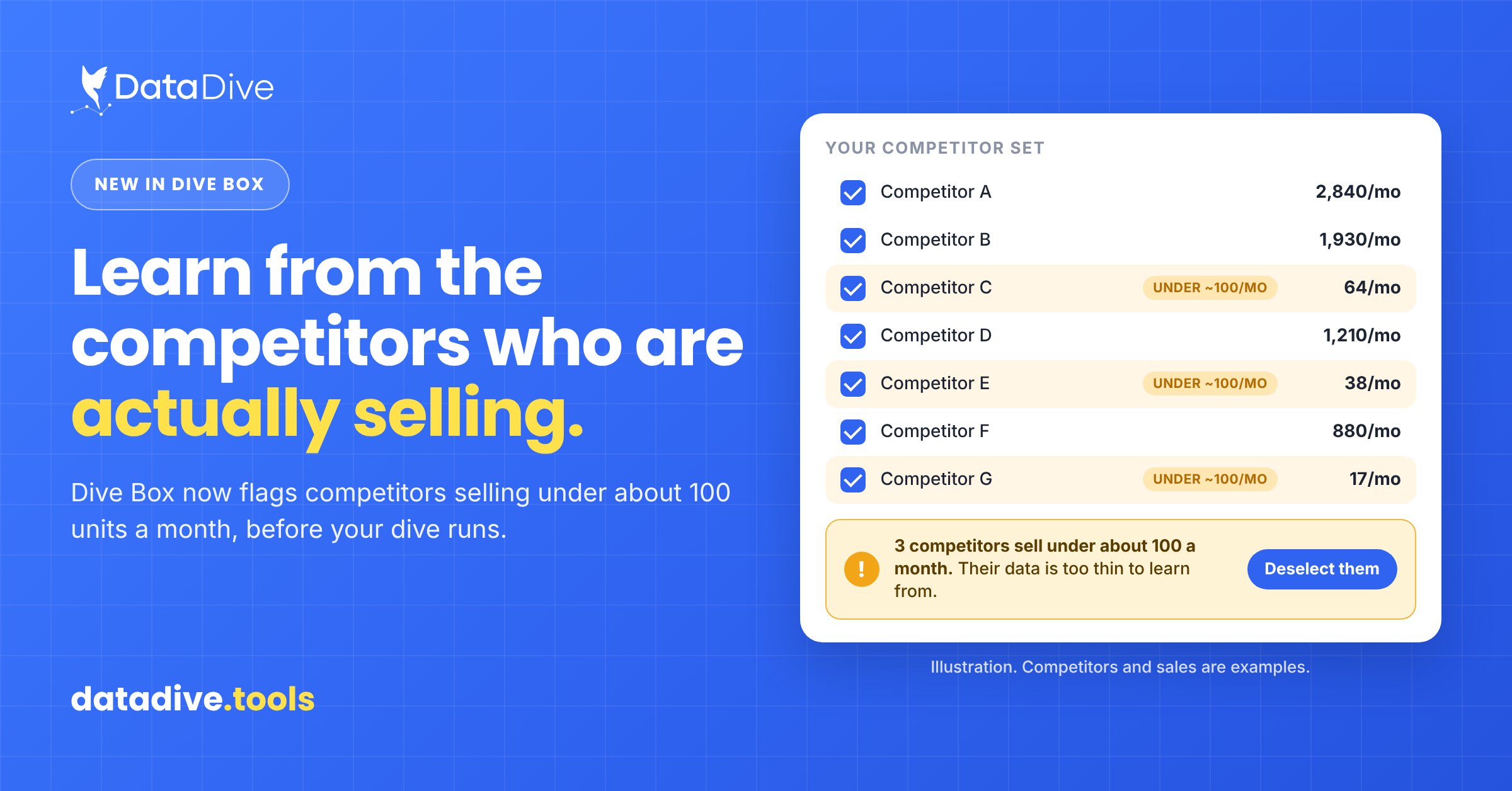
Data Dive’s Dive Box now warns you about competitors selling under about 100 units a month before a dive runs, so you learn from the sellers who are actually selling.